
In this guide
1. Why LinkedIn Ad Intelligence Is Different
Competitive ad research on Meta tells you how brands reach consumers at the interest and behavior level. Google tells you how they show up at the moment of active search intent. LinkedIn tells you something more specific: how your competitors are positioning themselves to professional buyers, the exact same audience you're trying to reach, with messages calibrated to job function, seniority, and company context.
That specificity cuts both ways. LinkedIn CPCs are significantly higher than other platforms (often three to five times what you'd pay on Meta for a comparable reach), which means every ad a competitor is running represents a deliberate, expensive choice. Brands don't waste budget on LinkedIn the way they might on a lower-cost channel. When you see a competitor running a sustained campaign on LinkedIn, you're looking at a strategic commitment, not an experiment. That makes the signals you can extract from their ads more meaningful, not less.
There's also a B2B-specific dynamic that doesn't exist on other platforms: LinkedIn ads often reveal funnel strategy more transparently than elsewhere. A competitor running a Thought Leadership ad from a senior executive is trying to build top-of-funnel awareness with decision-makers. One running a Document Ad offering a technical whitepaper is targeting buyers already in an evaluation phase. One running a Conversation Ad is attempting direct engagement with a named prospect list. The format choice itself is a strategic signal, which is not something you can say about a Facebook image ad.
2. The 6 LinkedIn Ad Formats Worth Tracking
LinkedIn has expanded its ad format library significantly in recent years. Understanding what each format is designed to do helps you interpret what a competitor is trying to achieve when you see them using it.
1. Single Image Ads
The most common format. A sponsored post with image, intro copy, headline, and CTA. Used across the full funnel from awareness to conversion.
2. Video Ads
Sponsored video content in the feed. Higher production cost signals a meaningful brand or awareness investment. Watch for explainer videos vs. testimonial-style content.
3. Carousel Ads
Multiple swipeable cards in a single ad unit. Often used to present multiple use cases, product features, or a sequential narrative. Good for mid-funnel education.
4. Document Ads
Promoted PDFs or slide decks that users can scroll through in-feed. Almost exclusively a lead generation and mid-funnel nurture format, often gated or used to collect leads.
5. Thought Leadership Ads
Promoted posts from individual employee profiles rather than the company page. Signals investment in personal brand and executive visibility with senior audiences.
6. Message & Conversation Ads
Delivered directly to LinkedIn inboxes. High-cost, high-intent format. If a competitor is running these, they're targeting a specific, named audience list aggressively.
Not all of these are visible via LinkedIn's Ad Library (message and conversation ads, for example, don't always surface publicly). But single image, video, carousel, document, and thought leadership ads are generally discoverable, which covers the majority of what most B2B advertisers are spending on.
3. How to Find Competitor LinkedIn Ads
There are two main access points for competitor LinkedIn ad research, each with different strengths. Neither is as comprehensive as Meta's Ad Library, but together they give you a workable picture of what competitors are running.
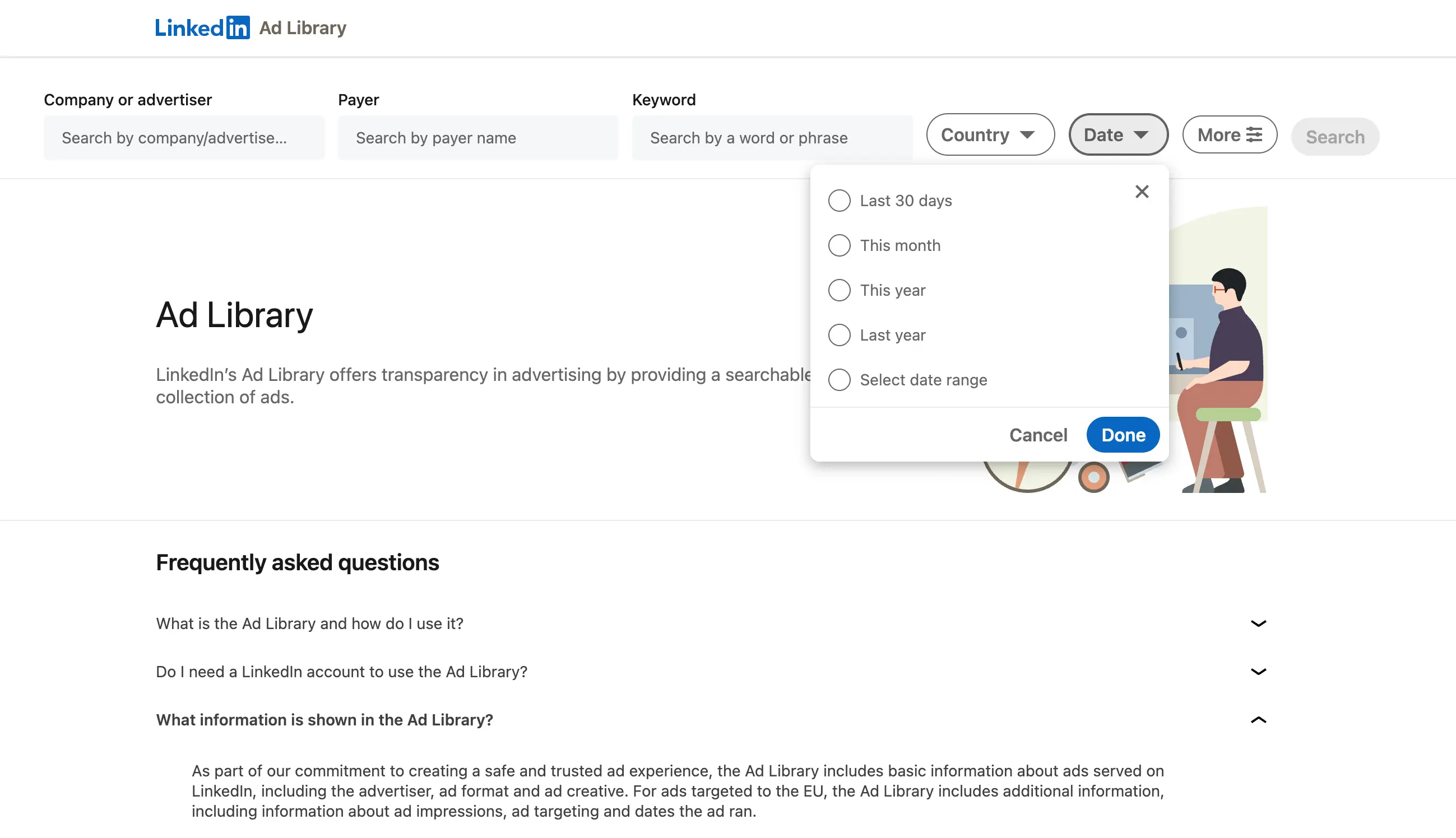
LinkedIn's Ad Library
LinkedIn has its own transparency tool, accessible through the main LinkedIn Ad Library pageor a company's LinkedIn page in the "Posts" section.
What you can see: the full creative (image or video), the intro copy, the headline, the CTA button, and in some cases the landing page URL.
For ads targeted to the EU, the Ad Library includes additional information, including information about ad impressions, ad targeting and dates the ad ran.
What you can't see: targeting parameters (outside of EU), spend estimates, how long the ad has been running, or inactive ads. LinkedIn's transparency tool is more limited than Meta's, and there's no intuitive advanced search or filtering. It's a starting point, not a research platform.
Your own LinkedIn feed
The second access point is your own feed, but used deliberately. If you work in B2B and are connected to the right people and companies, LinkedIn's algorithm will naturally surface competitors' sponsored content to you over time. You can accelerate this by following competitor company pages, engaging with content in your category, and visiting competitor websites to trigger their retargeting pixels.
When a competitor ad appears in your feed, you can click the three-dot menu on the post and select "Why am I seeing this ad?" LinkedIn will tell you the targeting criteria used: job function, seniority, company size, industry, or a matched audience. This is meaningful intelligence. If a competitor is targeting "VP-level and above in companies with 500+ employees in the SaaS sector," that tells you the exact audience they're prioritizing and the deal size they're going after.
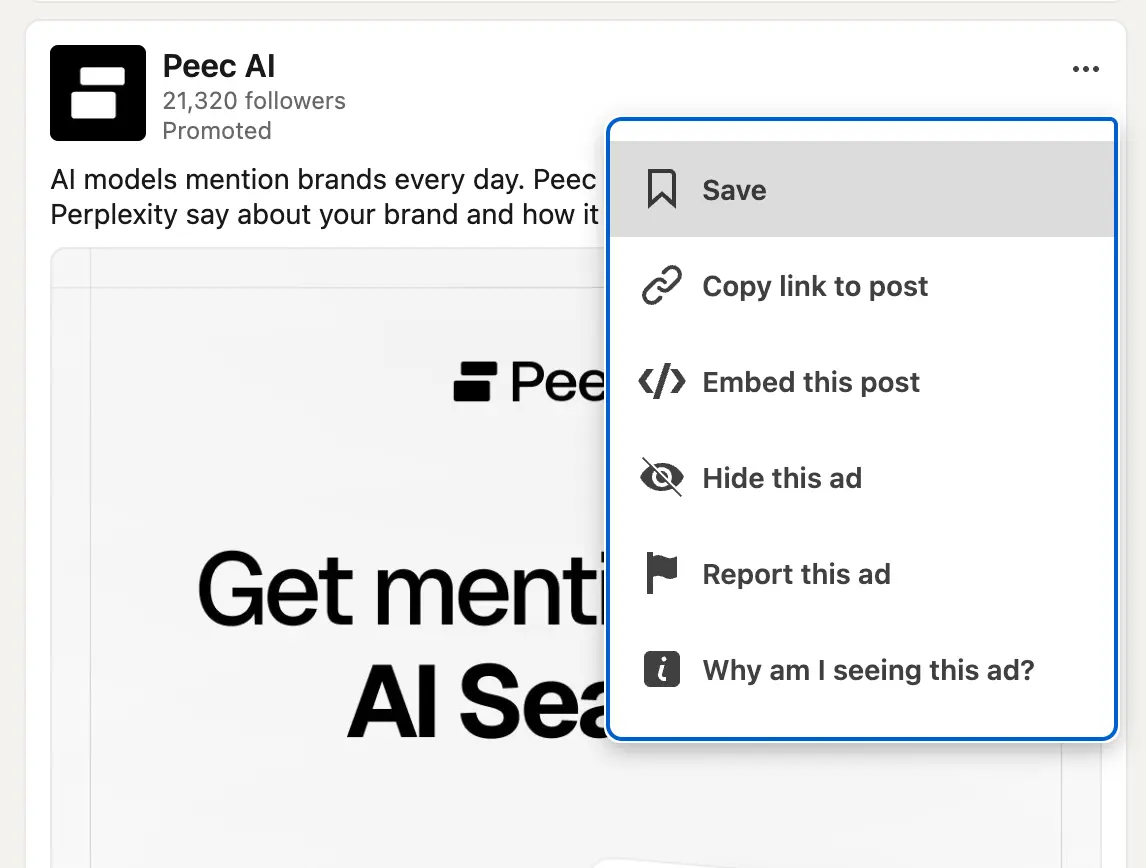
What to capture: A competitor's sponsored post in a LinkedIn feed, with the three-dot menu open and "Why am I seeing this ad?" visible. If possible, show the targeting explanation panel that appears after clicking it, with targeting criteria like job function, seniority, and company size visible. Annotate each targeting dimension.
Third-party tools
Tools like Adluv, Foreplay and Adslibrary offer broader LinkedIn ad tracking capabilities than the native Ad Library, including historical creative archives, cross-platform views alongside Meta and Google activity, and alerts when tracked companies launch new campaigns. For B2B marketing teams running ABM programs or tracking multiple competitors systematically, a dedicated platform removes the manual overhead that makes native research unsustainable.
4. What to Actually Analyze
LinkedIn ads are denser with strategic information than ads on most other platforms, because the audience context is so specific. Here's how to read each layer of what you're looking at.
The intro copy: how they open the conversation
The intro copy (the text above the image or video, before the headline) is where most of the strategic messaging lives in a LinkedIn ad. This is where competitors choose whether to lead with a pain point, a provocative question, a data point, a case study reference, or a direct product claim. Because LinkedIn audiences are professional and skeptical, the intro copy often reveals more considered positioning than you'd see in a consumer-facing ad. It's written for someone who will read it carefully and judge it critically.
CTA as funnel stage signal
- **Intro copy:**Where the strategic hook lives. Look for the pain point, proof point, or provocation they're leading with. This is the most deliberate part of the ad.
- **Creative:**Image or video treatment. Look at whether it's branded/corporate, data-driven, team/people-focused, or product-screenshot-led. Each signals a different audience relationship.
- **Card headline:**The compressed value proposition. Often the most A/B tested element. What problem or outcome are they naming here?
- CTA button:"Learn More," "Download," "Register," "Request Demo," "Get Quote." The CTA reveals where in the funnel this ad sits and what conversion action they're optimizing toward.
The CTA: reading the funnel stage
The call to action on a LinkedIn ad is one of the most immediately revealing signals about where a competitor is focusing their funnel efforts. A "Learn More" CTA sending traffic to a blog post or product overview page is a top-of-funnel awareness play. A "Download" or "Get the Report" CTA is a lead generation play aimed at in-market buyers willing to exchange contact details. A "Request a Demo" or "Get a Quote" CTA is a bottom-of-funnel conversion push targeting audiences that are already close to a buying decision.
When you see a competitor running multiple LinkedIn campaigns simultaneously with different CTAs, you're looking at a full-funnel strategy. When they're running only bottom-of-funnel CTAs, they're either not investing in awareness or they're relying on other channels for that work. Both patterns are worth understanding in the context of your own funnel strategy.
CTA as funnel stage signal
- Top of funnel:"Learn More," "Follow," "Watch Now" (building awareness with cold audiences)
- Mid funnel:"Download," "Register," "Get the Guide" (capturing leads from in-market buyers)
- Bottom of funnel:"Request a Demo," "Get a Quote," "Start Free Trial" (converting warm, high-intent audiences)
The creative: what it signals about audience relationship
LinkedIn ad creative tends to fall into a few recognizable categories, and the choice between them reveals something about how the advertiser thinks about their relationship with the audience. Clean, branded creative with product screenshots or UI previews signals a company selling to buyers who want to evaluate the product before engaging. Thought leadership creative (a quote from a senior executive, a bold claim, a data point) signals a company trying to earn credibility with skeptical decision-makers. People-forward creative (team photos, customer faces, event imagery) signals a company trying to build trust and relatability with an audience who buys on relationships as much as features.
None of these approaches is inherently better, but each reflects a deliberate strategic choice about what that audience needs to see before they'll convert. When a competitor shifts creative style significantly, something has changed in their thinking about their audience.
The landing page: where strategy becomes concrete
LinkedIn ad landing pages reveal strategic intent more clearly than almost anything else you can observe externally. The page a competitor sends LinkedIn traffic to tells you what conversion action they consider most valuable from this audience. Is it a dedicated product demo page? A case study library? A pricing page? A gated report? The specificity of the destination is often more telling than the ad itself.
Pay particular attention to message match between the LinkedIn ad and the landing page. A competitor who has built a tightly tailored landing page matching the exact language and offer in their LinkedIn creative has invested meaningfully in that conversion path. That level of investment signals the audience segment and conversion action they're most serious about on this channel.
5. How to Identify What's Working Without Performance Data
LinkedIn Campaign Manager is private. You can't see a competitor's CTR, CPL, or conversion rate. But you can make well-grounded inferences about what's performing and what's strategic based on observable patterns in what they're running.
| SIGNAL | WHAT IT LOOKS LIKE | WHAT IT TELLS YOU |
|---|---|---|
| Ad volume and variety | Multiple active ads simultaneously across different formats and messages | High volume signals meaningful budget and an active testing culture. A competitor running 10+ active LinkedIn ads is investing seriously in the channel. |
| Format consistency | A competitor keeps returning to the same format (e.g., always Document Ads, always Thought Leadership) | Format consistency over time usually means that format is converting for them. Brands don't keep paying for formats that don't work. |
| Message repetition | The same positioning angle, pain point, or value claim appears across multiple ads and over multiple months | Sustained message repetition is almost always a signal of validated messaging. They've tested their way to it and it's resonating with their audience. |
| Thought Leadership investment | Senior executives running promoted personal posts at scale, not just the company page | Thought Leadership Ads are expensive and require executive time. A competitor committing to them at scale is making a deliberate bet on personal brand as a demand generation channel. |
| ABM signals | Ads with very specific audience language (naming industries, job titles, or company sizes directly in the copy) | Hyper-specific copy indicates Account-Based Marketing targeting. The audience they're naming in the copy is usually the audience they're buying in Campaign Manager. |
| Funnel breadth | Simultaneous top, mid, and bottom-of-funnel campaigns running at the same time | Full-funnel LinkedIn investment signals a mature, well-resourced B2B marketing operation. A competitor only running bottom-of-funnel ads may be under-resourced or relying on other channels for awareness. |
The ABM copy signal
If a competitor's ad copy directly names a job title, industry, or use case (for example, "For Revenue Operations Leaders at Series B+ companies"), that specificity is not accidental. It's almost certainly an ABM audience mirror, where the copy reflects the exact targeting parameters in their campaign. That tells you precisely who they're prioritizing and how they're framing value for that segment.
6. Why Manual Tracking Breaks Down
LinkedIn competitive research has a compounding fragmentation problem that makes it even harder to sustain manually than equivalent research on Meta or Google. LinkedIn's native Ad Library is one of the most limited transparency tools of any major platform. You can see currently active ads from a company page, but there's no date information, no engagement data, no ad history, no filtering, and no way to track changes over time. You're seeing a static snapshot with no temporal context.
In practice, what manual LinkedIn competitive research looks like for most teams is this: someone screenshots a competitor ad when they happen to see it in their own feed, pastes it into a Slack channel or a Notion page, and moves on. There's no system to ensure anything is captured consistently, no way to know how long an ad has been running, no visibility into what was running last month, and no mechanism to alert the team when something new launches. Three months later, a competitor has pivoted their entire messaging strategy and nobody noticed until a new hire asked about it in an all-hands.
The cost of this approach isn't just the missed intelligence. It's the repeated work. Every time someone decides to do a competitive audit, they're starting from scratch, because there's no accumulated record. And because LinkedIn research is harder to do manually than Meta research (fewer public tools, less standardized access), the audits happen less frequently, which compounds the staleness problem further.
Without a proper system
- Competitor ads only spotted when someone happens to see them in their feed
- No date context: impossible to know how long an ad has been running
- No ad history: changes in messaging go unnoticed for months
- Format and funnel strategy invisible without manual, inconsistent tracking
- No alerts when a competitor launches a new campaign or pivots messaging
- Research starts from zero every cycle, so nothing compounds
- LinkedIn tracked in isolation, disconnected from Meta and Google activity
With a structured system
- All active ads from tracked competitors surfaced automaticall
- Run time and creative history visible alongside each ad
- Messaging changes and new campaigns flagged in real time
- Format, CTA, and funnel stage tracked across every competitor
- Alerts delivered via email or Slack when new ads launch
- Shared collections that accumulate into a growing intelligence library
- Cross-platform view: LinkedIn alongside Meta and Google for the full picture
There's also a bigger-picture problem that manual LinkedIn research misses entirely. The competitors you're tracking on LinkedIn are almost certainly also running campaigns on Meta and Google. Their LinkedIn messaging rarely exists independently of their broader paid media strategy. Understanding what they're investing in across all three channels is what gives you a complete read on where they're putting budget, what audiences they're prioritizing, and what funnel stage they're focused on. That picture is only visible when you're tracking across platforms, not just one channel in isolation.
7. How to Build a System That Scales
The most valuable competitive intelligence on LinkedIn is the kind that accumulates over time. A one-time audit of what a competitor is running this week is a useful starting point. But knowing that their messaging shifted from product features to customer outcomes between Q1 and Q3, and that their shift to Thought Leadership Ads coincided with a new CMO hire, is the kind of institutional knowledge that actually informs strategy. That level of insight only comes from continuous, structured tracking.
Define your B2B watchlist
Start with five to eight companies you want to monitor consistently on LinkedIn: your direct competitors, companies targeting the same buyer persona even with a different product, and one or two companies whose B2B marketing you consider best-in-class. Keep the list focused. The goal isn't comprehensiveness. It's to build a deep, nuanced understanding of a small number of players who genuinely matter to your category.
Track format and funnel stage, not just copy
When you save a competitor ad, record more than the creative. Note the format (single image, video, document, thought leadership), the CTA, the inferred funnel stage, and where the ad clicks through to. Over time, this structured tagging reveals patterns that are invisible from any single ad: a competitor steadily shifting budget toward bottom-of-funnel formats, or a sudden increase in Document Ad volume that suggests a new lead generation push for a specific segment.
Connect LinkedIn to the broader picture
LinkedIn rarely tells the complete story on its own. The most sophisticated version of B2B competitive intelligence is connecting what a competitor is doing on LinkedIn with what they're running on Meta and Google simultaneously. A competitor running heavy brand awareness on Meta while pushing demo requests hard on LinkedIn is building a two-channel funnel worth understanding. One pulling back on LinkedIn while increasing Google spend may be responding to CPL pressure. The cross-channel picture is what makes individual channel observations meaningful.
What a mature LinkedIn competitive research workflow looks like
Monthly review of active ads from your watchlist. Structured tagging by format, CTA, and funnel stage. Alerts for new campaign launches. Landing page tracking to catch messaging pivots. Cross-platform comparison alongside Meta and Google activity. Shared collections your team can annotate and build on over time.
This is exactly what we built Adluv for. Instead of checking LinkedIn ad pages manually, screenshotting what you find, and losing track of it in a shared folder, Adluv gives your team one place to monitor any brand's ad activity across LinkedIn, Meta, Google, and beyond. You get real-time alerts when tracked companies launch new campaigns, a cross-platform view of each competitor's full paid strategy, and shared collections that build into a genuinely useful competitive intelligence library over time.
Utilize AI-native ad intelligence
Adluv plugs into your AI workflow via Model Context Protocol (MCP) so research happens where the thinking does. Instead of switching between a dashboard and your AI tool to make sense of what you're seeing, you can query Adluv's competitor ad data directly from Claude, Cursor, or any MCP-compatible client.
In practice, that means you can ask questions like:
→ "What formats and CTAs is [competitor] running on LinkedIn right now, and which funnel stages are they targeting?"
→ "Which of our tracked brands has launched new LinkedIn campaigns in the last 30 days?"
→ "Summarize the messaging angles [competitor] is using across their active LinkedIn Thought Leadership ads."
8. Competitor Ads: Common Mistakes to Avoid on LinkedIn
Only looking at company page ads
Many B2B companies are increasingly running Thought Leadership Ads promoted from individual employee and executive profiles, rather than the company page. These ads often don't surface in the standard company page "Ads" tab view, which means if you're only checking the company page, you're missing a significant and growing slice of their LinkedIn investment. Set up alerts and follow key executives at competitor companies directly to catch this activity.
Treating the CTA as decoration
The call to action button on a LinkedIn ad is one of the single most information-dense elements in the entire creative. It tells you the conversion action, the funnel stage, the level of commitment being asked of the audience, and the type of relationship the competitor is trying to build with that buyer. A "Download" CTA and a "Request a Demo" CTA from the same competitor, running simultaneously, tell you they're working both early-stage education and late-stage conversion at the same time. Read every CTA carefully and record it whenever you save an ad.
Ignoring the targeting signal in the copy
LinkedIn's targeting capabilities are the most precise in B2B digital advertising. When a competitor writes ad copy that directly references a job title, a company stage, an industry vertical, or a specific pain point associated with a particular role, they're almost always mirroring their targeting parameters in the copy. This is a deliberate best practice (copy that matches the audience converts better), and it means their ad copy is effectively a public declaration of exactly who they're spending money to reach. Use it.
Researching LinkedIn in isolation from other channels
A competitor's LinkedIn strategy rarely exists in a vacuum. The messaging they're testing on LinkedIn is usually connected to what they're pushing on Meta and Google. Their LinkedIn budget often reflects decisions made at the full-channel level. When you see a competitor going quiet on LinkedIn, it might not mean they're pulling back from B2B marketing. It might mean they've shifted spend to Google or are testing a new channel entirely. You can only see that pattern if you're tracking across platforms simultaneously.
Key takeaways
- LinkedIn ad intelligence is especially valuable in B2B because the audience targeting is so precise
- The format a competitor chooses (single image, video, document, thought leadership) is itself a strategic signal
- Use the company page "Ads" tab and your own feed deliberately, including the "Why am I seeing this" targeting panel
- Read every component: intro copy, creative treatment, card headline, and especially the CTA button
- Copy that names job titles or company stages is almost always a mirror of the targeting parameters being used
- Message consistency and format repetition over time are the strongest signals that something is working
- Manual LinkedIn tracking breaks down quickly because the native library has no history, dates, or alerts
- Cross-platform tracking (LinkedIn alongside Meta and Google) is where the complete competitive picture emerges
- Adluv's MCP integration lets you query competitor LinkedIn ad data directly inside Claude, Cursor, and other AI tools, so research happens where the thinking does
Track Every Competitor Ad. Across Every Platform
Adluv monitors competitor ad activity across LinkedIn, Meta, Google, and beyond, with landing pages, run-time data, real-time alerts, and shared collections your whole B2B marketing team can build on. Plus: query it all directly from Claude or Cursor via our MCP integration.