
In this guide
1. Why Cross-Platform Tracking Is the Only Approach That Works
No competitor runs ads on just one platform. The brands you compete with are almost certainly active across Meta, Google, and LinkedIn simultaneously, allocating budget differently across each channel based on their audience, funnel stage, and what's converting. When you only track one channel, you see a fragment of their strategy and risk drawing the wrong conclusions from it.
Consider what you miss. A competitor who appears to be going quiet on LinkedIn might be reallocating budget to Meta for a direct-response push. One running low ad volume on Google might be running heavy video investment on Instagram. A brand you assume is focused on awareness might be running aggressive bottom-of-funnel search campaigns you've never seen because you're not tracking their search activity.
The cross-platform picture also tells you things no single channel can. When a competitor runs the same core message across Meta, Google, and LinkedIn simultaneously, that's a deliberate, coordinated push worth paying attention to. When their messaging differs sharply between channels, they're segmenting their audience in a specific way. When one channel goes dark while another heats up, something has changed in their strategy or economics. None of that is visible from a single-platform view.
2. Tracking Competitor Ads on Meta (Facebook & Instagram)
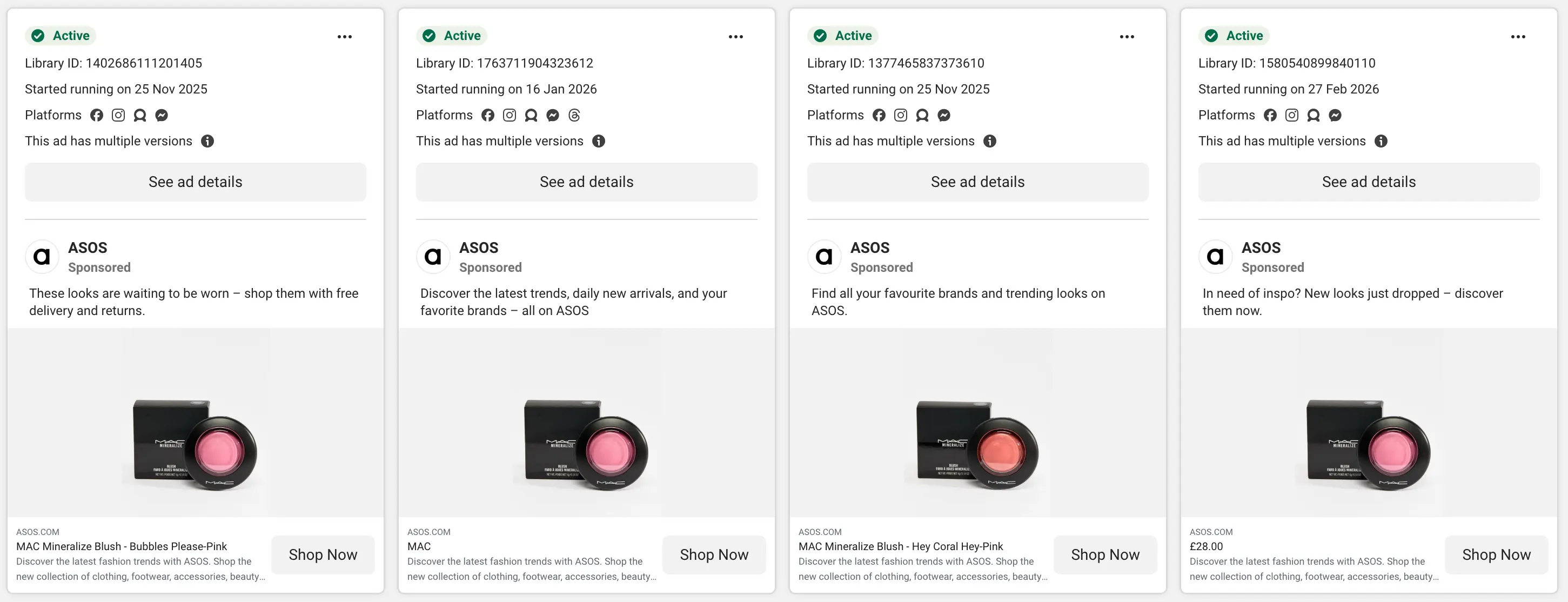
Meta is where creative strategy lives. The platform's Ad Library makes every active ad from any brand publicly searchable, which means you can see exactly what competitors are testing right now: their hooks, creative formats, offers, and how long each ad has been running. Ad longevity is your primary performance proxy here. An ad running for 30 or more days without changes is almost certainly profitable. Brands don't keep paying for ads that don't work.
Where to look
The Meta Ads Library is free and shows every currently active ad across Facebook and Instagram. Search a competitor's page name, set the category to "All Ads," and you'll see every creative with start dates, platform distribution, and full copy. In EU regions, estimated reach and spend ranges are also visible.
What to analyze
Look beyond aesthetics. The hook (the first line of copy or opening video frame) is the most tested element of any Meta ad, so pay close attention to whether competitors are leading with pain points, benefits, or social proof. Track the creative format mix (UGC vs polished production tells you what's converting for their audience), the offer structure (discount, trial, demo, lead magnet), and always follow the click through to the landing page. The ad is only half the funnel.
Full Meta competitor ads research guide
For a complete walkthrough of the Meta Ad Library, how to analyze creative and copy, and how to build a swipe file that stays useful over time.
Read: How to Track Competitor Ads on Meta (Facebook & Instagram) →
3. Tracking Competitor Ads on Google Ads
Google is where purchase intent lives. Search ads reach people who are actively looking for what you sell, which makes the competitive signals here different in character from Meta or LinkedIn. You're not observing how a brand builds awareness. You're seeing how they position at the exact moment a buyer is ready to evaluate options. The keywords they bid on, the headlines they write, and the landing pages they build for paid search tell you how they compete at the bottom of the funnel.
Where to look
The Google Ads Transparency Center is free and shows a brand's active ad formats and creative history across search, display, Shopping, and YouTube. Supplement this by running direct searches on your 20 to 50 most important keywords from an incognito window to see exactly how competitors position at the moment of active purchase intent.
What to analyze
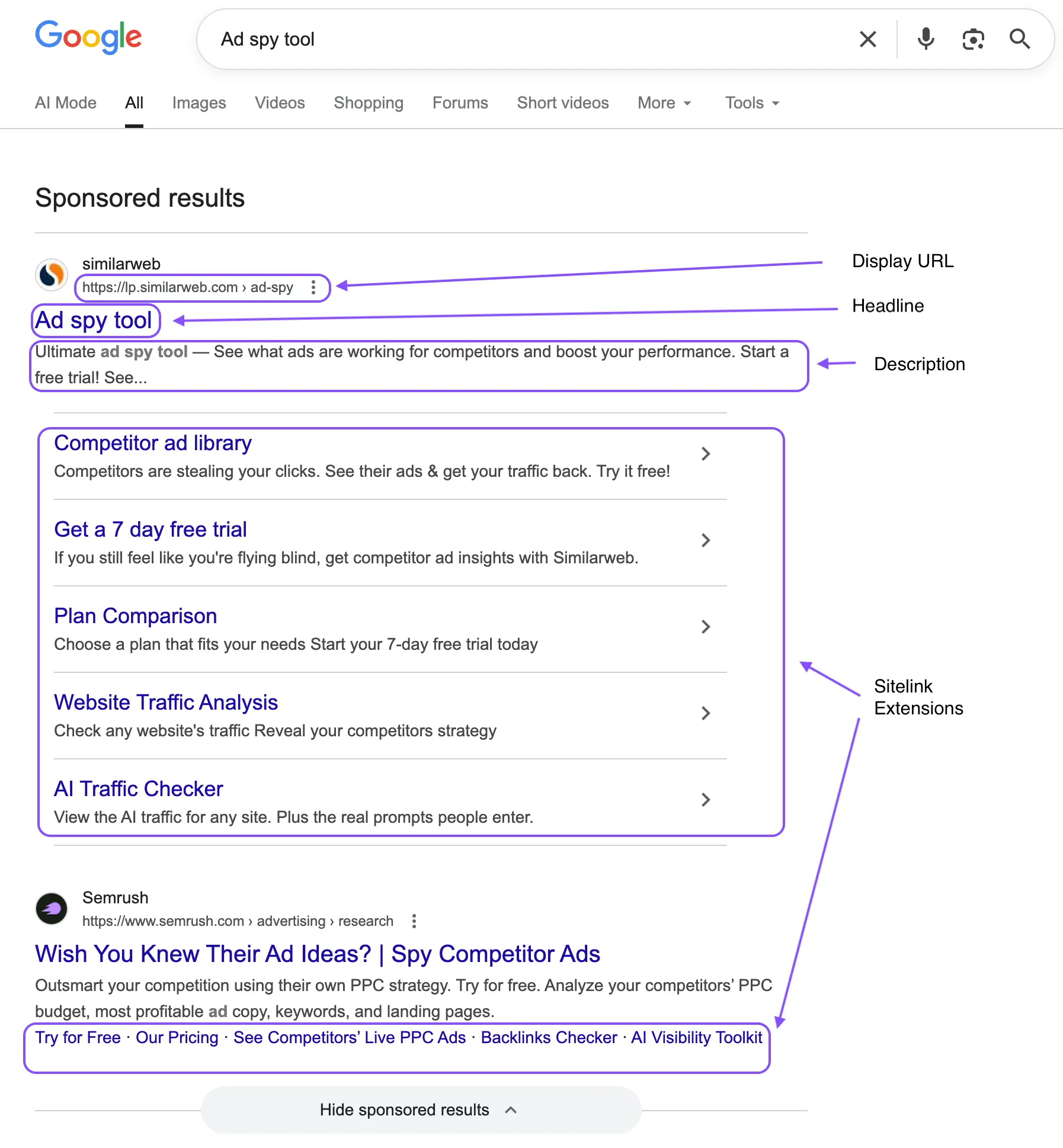
Read the full ad, not just the headline. Ad extensions (sitelinks, callouts, structured snippets, price extensions) are where competitors often reveal the most about what they think their customers care about. A callout that reads "No Long-Term Contracts" is a direct response to a known objection. Sitelinks that feature a specific use case reveal the customer segment they're most actively pursuing. And always follow the click: a competitor sending all paid search traffic to the homepage has a very different level of sophistication than one with dedicated landing pages per keyword cluster.
The conquest keyword signal
If a competitor is bidding on your brand name, read their ad carefully. The angle they use in that ad tells you exactly where they think they have an advantage over you. It's one of the most direct competitive intelligence signals available on any platform.
Full Google Ads competitor ads research guide
For a complete walkthrough of the Transparency Center, how to read search ad anatomy, ad extensions as strategy signals, and building an ongoing keyword monitoring system.
Read:****How to Track Competitor Ads on Google Ads →
4. Tracking Competitor Ads on LinkedIn
LinkedIn is where B2B buying decisions get shaped. The platform's precision targeting (job title, seniority, company size, industry) means every ad a competitor runs there is an expensive, deliberate choice directed at a specific professional audience. LinkedIn CPCs run three to five times higher than Meta, which means the ads you find here aren't experiments. They're strategic commitments.
Where to look
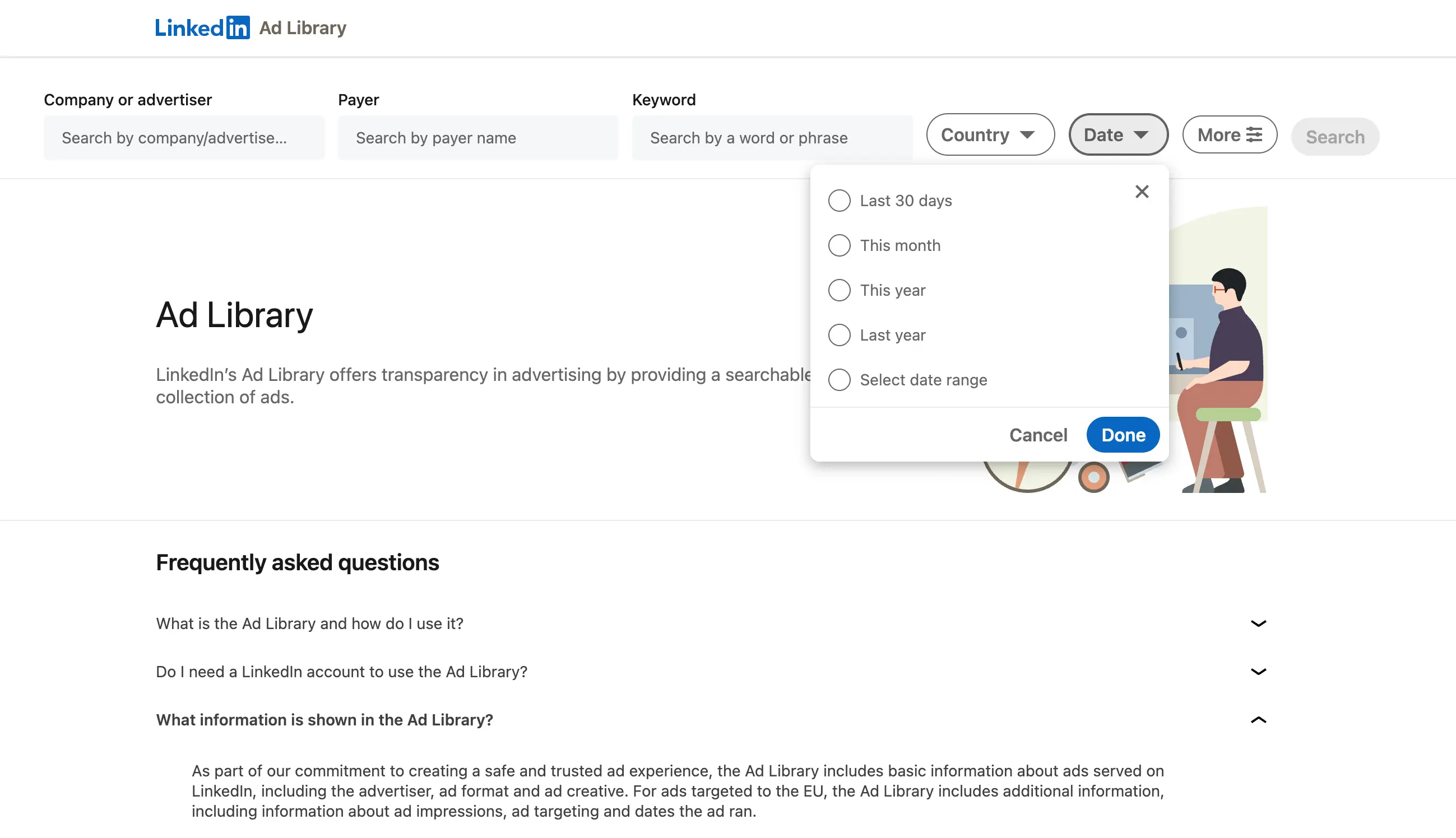
Navigate to a competitor's LinkedIn company page, go to their Posts section, and click the Ads tab to see all currently active sponsored content. Supplement this by deliberately entering competitor funnels (visiting their website, following their page) to trigger retargeting, then reading the "Why am I seeing this ad?" panel when their sponsored posts appear in your feed. That panel reveals targeting criteria: job function, seniority, company size, and whether it's a matched audience upload.
What to analyze
On LinkedIn, the format choice itself is a strategic signal. A competitor running Document Ads is targeting in-market buyers willing to exchange contact details. One running Thought Leadership Ads from senior executives is making a deliberate bet on personal brand with decision-makers. One running Conversation Ads is targeting a named prospect list directly. The CTA button is equally telling: "Learn More" is a top-of-funnel awareness play; "Request a Demo" is a bottom-of-funnel conversion push. When a competitor runs both simultaneously, they're working a full-funnel LinkedIn strategy with meaningful budget.
Full LinkedIn competitor ads research guide
For a complete walkthrough of LinkedIn's Ad Library, how to decode format and CTA as funnel signals, the ABM copy intelligence technique, and cross-platform tracking.
Read: How to Track Competitor Ads on LinkedIn →
5. Reading Cross-Platform Signals Together
The most valuable competitive intelligence comes from looking at all three channels simultaneously and asking what the pattern across them reveals about a competitor's overall strategy. Individual platform observations are useful. Cross-platform patterns are actionable.
| PATTERN | WHAT IT LOOKS LIKE | WHAT IT TELLS YOU |
|---|---|---|
| Coordinated brand push | The same core message running simultaneously across Meta, Google, and LinkedIn | A deliberate, budget-heavy campaign. Usually tied to a product launch, repositioning, or aggressive growth phase. Watch closely for 4-6 weeks. |
| Channel specialization | Heavy Meta creative volume, minimal Google search activity | Investing in social acquisition over demand capture. May indicate a new market entry or a new audience segment being targeted. |
| Funnel split | Awareness creative on Meta, demo-request CTAs on LinkedIn, high-intent keywords on Google | A mature multi-channel funnel where each platform plays a distinct role. Indicates significant marketing investment and a well-resourced team. |
| Channel pullback | Activity drops sharply on one platform while remaining consistent on others | Budget pressure, poor channel performance, or a strategic pivot. The channel they stay on tells you where they're finding the best return. |
| Message divergence | Different value propositions or hooks on different platforms | Deliberate audience segmentation. What they say to LinkedIn's professional audience vs Meta's broader one tells you how they think about different buyer types. |
| Offer escalation | Increasingly aggressive offers appearing across platforms over a short window | Pipeline pressure or a growth push. Shifting from "Book a Demo" to "Get 50% Off" across channels simultaneously usually signals a commercial inflection point. |
6. What to Actually Analyze Across All Three Platforms
The analysis framework is largely consistent regardless of platform. You're always asking the same questions, just interpreting the answers through a platform-specific lens. Here's what to look for in every ad you study, regardless of where you found it.
The message and hook
What angle is the competitor leading with, and does it hold across channels? A brand that leads with a pain point on Meta, a feature claim on Google, and an ROI case study on LinkedIn is telling you how they think about different audience relationships. When the same hook appears everywhere, they've either found a message that works universally or haven't invested in channel-specific optimization. Both are useful to understand.
The offer
What are they asking the audience to do, and how does that change by platform? Free trials and downloads tend to live at the top of the funnel on Meta and LinkedIn. Demo requests and consultation bookings tend to sit at the bottom. When a competitor runs bottom-of-funnel CTAs on Meta, they're targeting warm audiences or retargeting with strong purchase intent signals. The offer tells you where they think each audience sits in the buying journey.
Reading the offer across platforms
- Meta:"Get 30 days free" (broad audience, low commitment, high-volume acquisition play)
- Google:"See pricing" (in-market buyer who is actively comparing options and ready to evaluate cost)
- LinkedIn:"Book a personalized demo" (decision-maker targeted by job title, high-intent conversion push)
The landing page
This is the most consistently overlooked element of cross-platform competitive research, and also the most revealing. Always follow the click from every ad you study. A competitor who has built dedicated landing pages per platform, per audience segment, and per keyword cluster has invested meaningfully in their conversion funnel. One sending all traffic to the homepage has not. The landing page also shows you conversion architecture: what they ask for, in what order, and what they're willing to offer to close the gap between click and conversion.
Run time and volume as performance proxies
Across all three platforms, longevity and volume are your best proxies for performance when you can't see actual metrics. An ad running for 30 or more days on Meta is profitable. A search ad holding position 1 consistently over multiple months is doing so at a positive ROAS. A LinkedIn campaign running the same creative direction for two quarters has validated that message-audience fit. High volume across any platform signals an active testing culture and meaningful budget. The pattern across all three channels gives you a far clearer read than any single platform alone.
7. Why Manual Tracking Breaks Down
Every piece of research in this guide is technically achievable without dedicated tooling. You can check the Meta Ad Library, run Google searches, browse LinkedIn company pages, and keep notes. The problem isn't access. It's consistency, continuity, and the time cost of doing this across three platforms for multiple competitors on an ongoing basis.
In practice, manual cross-platform competitive research looks like this: a thorough audit happens before a quarterly planning meeting, findings get shared in a Slack message that's buried within 48 hours, and nothing gets revisited until the next planning cycle three months later. Meanwhile, competitors have launched new campaigns, tested new messages, updated landing pages, and shifted budget between channels. None of it was captured because there was no system to catch it continuously.
The fragmentation problem compounds further with scale. Monitoring five brands across three platforms means fifteen separate places to check. Add landing pages and you're at thirty or more touchpoints to review regularly. No team sustains that discipline manually over time, which is why competitive intelligence programs that start strong typically degrade into occasional audits within a quarter.
Manual, platform-by-platform research
- Three separate tools, three separate workflows, no integration
- Research happens before planning meetings, then goes stale immediately
- New campaign launches missed between manual check-ins
- Landing page changes invisible without regular manual visits
- No cross-platform view, so coordinated strategies go unnoticed
- Findings live in screenshots and folders no one can find later
- Each cycle starts from zero, so nothing compounds over time
Systematic cross-platform tracking
- One place for Meta, Google, and LinkedIn activity simultaneously
- Continuous monitoring, so research is always current
- Real-time alerts when tracked brands launch new campaigns
- Landing page tracking alongside creatives for the full picture
- Cross-platform view surfaces coordinated strategies and channel shifts
- Shared, organized collections the whole team can build on
- Research compounds: each cycle builds on the last
8. How to Build a System That Scales
The shift from occasional research to ongoing competitive intelligence comes down to three things: a defined watchlist, automatic alerts, and structured storage. Without all three, the system breaks under the pressure of everyday work.
Define your cross-platform watchlist
Start with five to eight brands to monitor consistently across all three platforms: your direct competitors, companies targeting the same buyer persona with a different product, and one or two aspirational brands whose paid media you respect. A focused watchlist builds deep, nuanced insight over time. A sprawling one produces noise. The goal is to understand a small number of players exceptionally well, not to have a surface-level view of twenty.
Get alerted, not reminded
The single biggest improvement you can make to your competitive research workflow is replacing manual checking with alerts. When a tracked competitor launches a new ad on any platform, you should know about it that day, not in three weeks when you remember to check. Real-time or daily alerts transform competitive intelligence from a project you schedule into continuous awareness that runs in the background.
Store with context, not just content
A swipe file of screenshots with no context is just a folder. A swipe file with dates, platforms, run times, and observations is a library. When you save a competitor ad, record the platform, the CTA, the inferred funnel stage, and what was notable about it. When someone on your team picks it up six months later, they should understand immediately what they're looking at and why it was worth saving.
What a mature cross-platform monitoring workflow looks like
Define your watchlist across Meta, Google, and LinkedIn. Receive alerts when tracked brands launch new ads on any channel. Save creatives with context into shared collections organized by theme and platform. Review cross-platform patterns monthly. Brief your creative and messaging teams with structured findings, not a folder of decontextualized screenshots.
This is exactly what we built Adluv for. Rather than maintaining three separate research workflows, Adluv gives your team one place to monitor competitor ad activity across Meta, Google, LinkedIn, and beyond, with landing pages, run-time data, real-time alerts, and shared collections that build into a genuinely useful competitive intelligence library over time.
Utilize AI-native ad intelligence
Adluv plugs into your AI workflow via Model Context Protocol (MCP) so research happens where the thinking does. Query competitor ad data across Meta, Google, and LinkedIn directly from Claude, Cursor, or any MCP-compatible client, without switching context or tools.
In practice, that means you can ask questions like:
→"Which of our tracked brands updated their landing pages in the last two weeks?"
→"Which competitor has the most new ad activity across Meta and LinkedIn this month?"
→"Compare the messaging angles [competitor] is using on Google vs LinkedIn right now."
Key takeaways
- No competitor runs ads on one platform: cross-channel tracking is the only approach that gives you a complete picture
- Meta shows creative strategy and what's working at the audience level, run time is your primary performance proxy
- Google shows how competitors compete at peak purchase intent, so read headlines, extensions, and landing pages together
- LinkedIn reveals B2B funnel strategy, and the format and CTA chosen are often more revealing than the copy itself
- Cross-platform patterns (coordinated campaigns, channel pullbacks, message divergence) are where the real strategic intelligence lives
- Always follow the click: landing pages reveal conversion strategy that the ad alone never shows
- Manual tracking across three platforms for multiple competitors is unsustainable, and it degrades into quarterly audits within months
- A proper system means alerts, shared organized storage, and a cross-platform view that compounds over time
- Adluv's MCP integration lets you query competitor ad data across all three platforms directly inside Claude, Cursor, and other AI tools
One Dashboard. Meta Ads, Google Ads & LinkedIn Ads.
Adluv monitors competitor ads across every major platform simultaneously, with landing pages, run-time data, real-time alerts, and shared collections your whole team can build on. Plus: query it all from Claude or Cursor via our MCP integration.