
In this guide
1. The Four Places Competitor Google Ads Appear
Before getting into how to find and analyze competitor ads, it's worth being clear about what you're actually looking for. Google Ads isn't a single format. Competitors can be running activity across four distinct surfaces, and each one tells you something different about their strategy.
1. Search Ads
Text ads that appear at the top and bottom of Google search results. The highest-intent placement in digital advertising.
2. Display Ads
Image and banner ads served across millions of sites in Google's Display Network. Used primarily for retargeting and brand awareness.
3. Shopping Ads
Product listing ads that appear in Google Shopping results, showing images, prices, and store names for direct product comparison.
4. YouTube Ads
Video ads running before, during, or alongside YouTube content, managed through Google Ads and visible in the Ads Transparency Center.
For most businesses, search ads are the most immediately actionable surface for competitive research, because they show you exactly how a competitor positions their value proposition at the moment of highest purchase intent. We'll focus primarily on search ads in this guide, with specific notes on what to look for in the other formats.
2. How to Find Competitor Google Ads
There are three main ways to find what competitors are running, each with different levels of depth and access. The right approach depends on how seriously you want to invest in this kind of research.
Method 1: Search Google directly
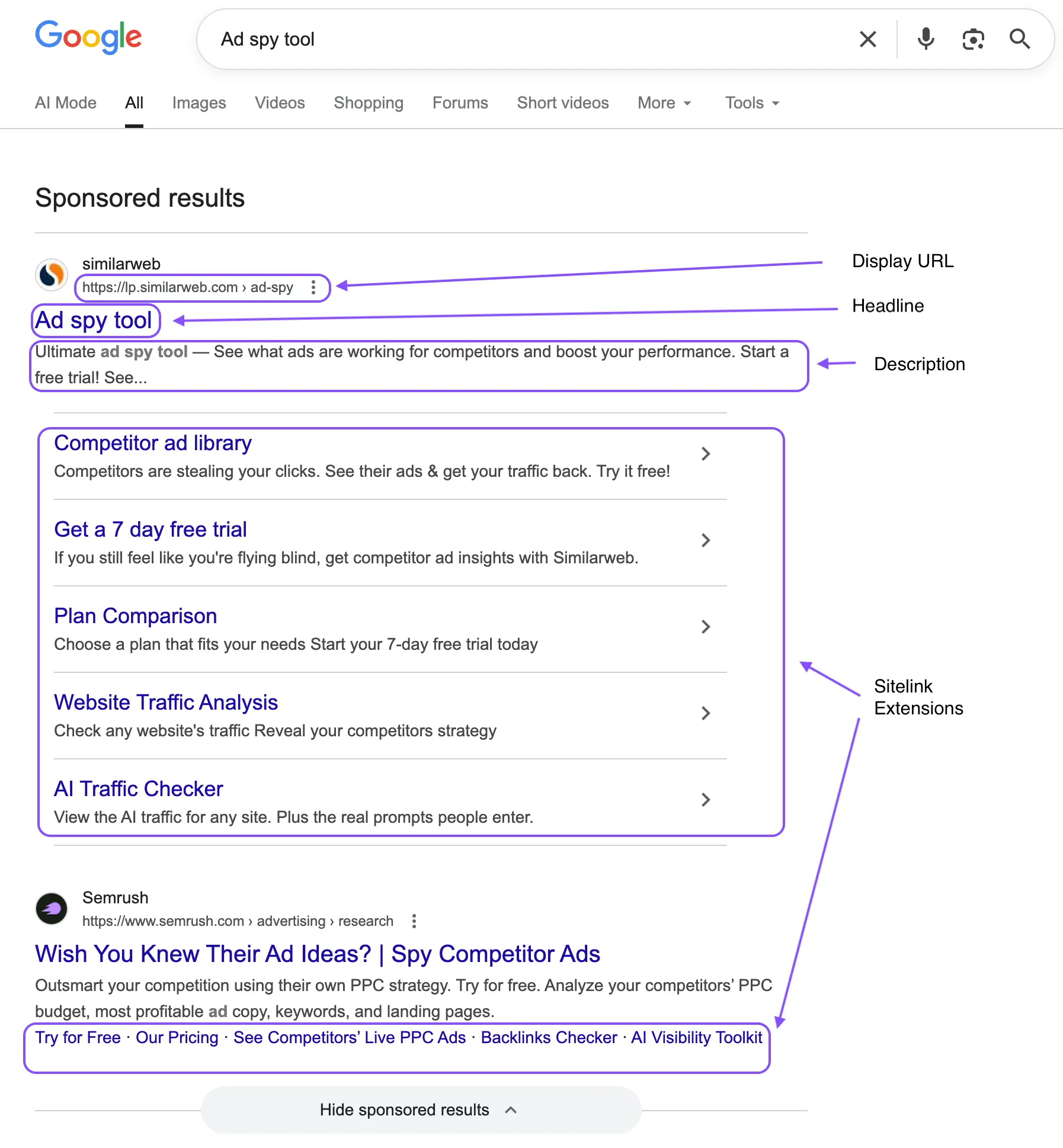
The most immediate way to see competitor search ads is simply to search Google for the keywords your customers use. Search the terms most relevant to your category, your product type, your main pain points, and your competitors' brand names. Look at what ads appear, note who is bidding, read the headlines and descriptions, and click through to the landing pages.
This works well for a quick snapshot, but it has limitations. The ads you see are personalized based on your location, device, and browsing history. Google's ad rotation means you won't see every variant a competitor is running, and you have no way to track what you find unless you're taking manual notes or screenshots.
Method 2: Google Ads Transparency Center
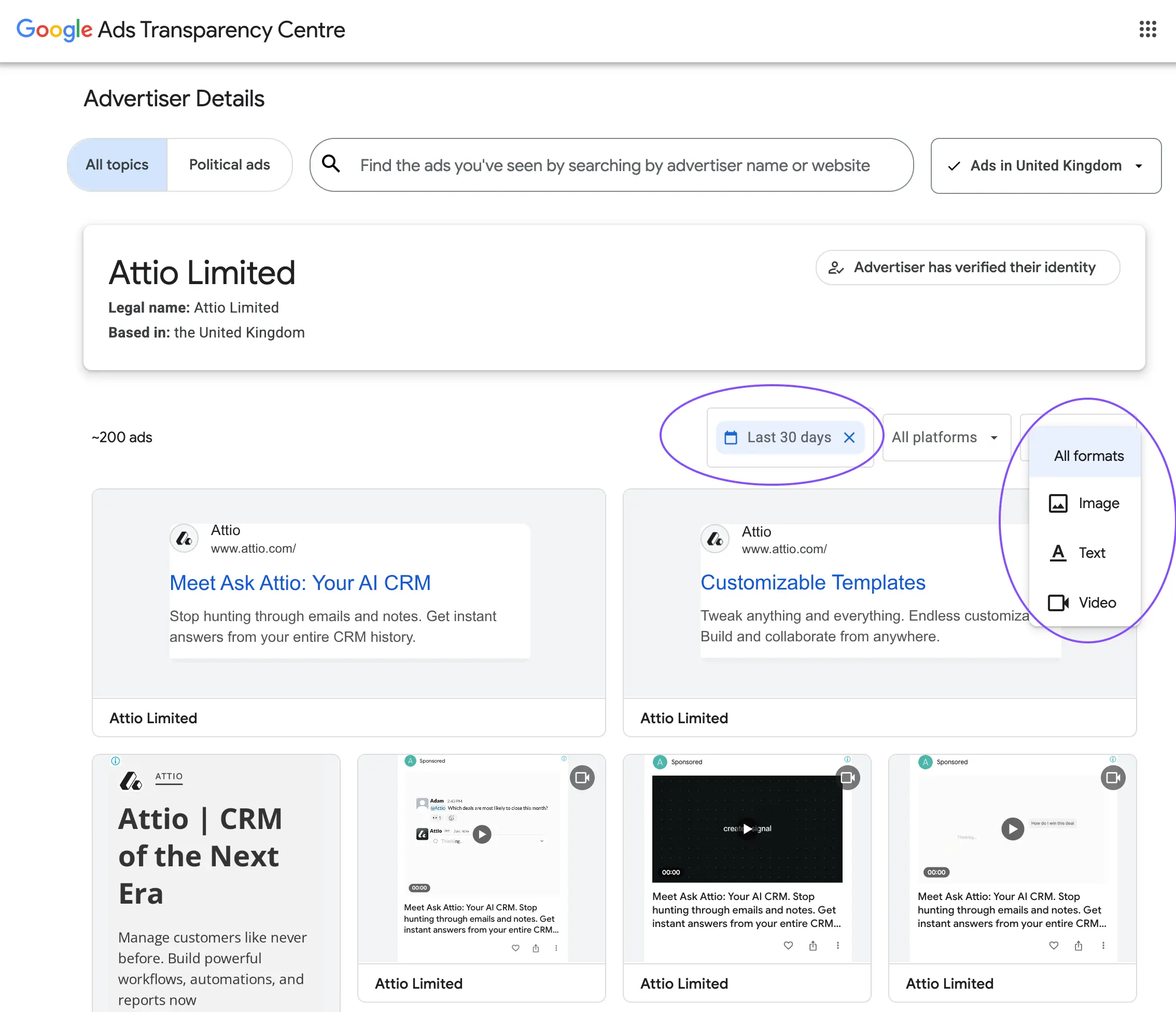
Google's Ads Transparency Center is a free tool that lets you search for any advertiser by name and see the ads they've been running across Google Search, Display, Shopping, and YouTube. It shows ad creatives, the formats being used, approximate dates ads ran, and in some cases geographic targeting.
It's less comprehensive than Meta's Ad Library (it doesn't always surface every active ad), but it's a legitimate starting point for understanding the breadth of a competitor's Google presence. You can see whether they're running text only or investing in display and video, which tells you something useful about their budget allocation and the stage of awareness they're targeting.
Method 3: Third-party tools
For deeper keyword-level intelligence, tools like SEMrush, SpyFu, Ahrefs, and SimilarWeb provide data on which keywords competitors are bidding on, estimated spend, ad copy history, Quality Score indicators, and keyword overlap analysis. These tools pull from their own data crawls and are particularly useful for identifying keywords you're not yet bidding on that competitors are investing in heavily.
The tradeoff is cost. These tools are subscription-based and can be expensive, though most offer a free tier with limited queries. For teams managing significant Google Ads budgets, they're worth considering. For earlier-stage businesses, direct search and the Transparency Center are strong starting points that cost nothing.
Which method to start with
If you've never done structured Google Ads competitive research before, start with 20 minutes of manual searching across your most important keywords, then use the Ads Transparency Center to look up your top two or three competitors by name. That alone will reveal more than most teams currently know about the competitive landscape.
3. What to Actually Analyze in Search Ads
Google search ads are compact. Each ad has a limited number of characters for headlines and descriptions, which means every word is a deliberate choice. That compression makes them unusually revealing. When you understand what each component signals, a competitor's search ad tells you a lot about their positioning strategy, their sense of what the customer cares about, and the offer they're using to win the click.
Ad anatomy: what each main component tells you
**Headlines:**Your three headlines are the highest-visibility real estate. Competitors use them to signal their primary value prop, a key differentiator, or a specific feature. Look at which slot each idea gets: slot one is what they lead with.
**Display URL:**The path fields after the domain are often keyword-stuffed for relevance, but sometimes reveal product categories or campaign structure that's strategically interesting.
**Description:**More space to elaborate on the value prop, handle objections, and include a call to action. Look for proof points (numbers, named clients, certifications) and urgency signals.
The headline: your most important signal
In a responsive search ad, competitors can test up to 15 headlines that Google rotates into different combinations. What you see in any given search is one slice of their testing. But the headlines that appear most consistently, especially in position one, are the ones Google has determined perform best based on click-through rate. These are the messages that resonated.
Ask yourself: is the competitor leading with a feature, a benefit, a pain point, a price signal, or social proof? Each approach reveals something about what they've found their customers actually click on.
Headline strategy examples for the same product
- Feature-led:"AI-Powered Competitor Ad Tracking" (leading with the technology)
- Benefit-led:"Stop Missing Competitor Ad Launches"(leading with the problem solved)
- Social proof:"Trusted by 2,000+ Marketing Teams" (leading with credibility)
When a competitor consistently leads with one type of headline across multiple keyword searches, that's a deliberate positioning choice, not an accident. It tells you how they've decided to compete.
Ad extensions: the underanalyzed layer
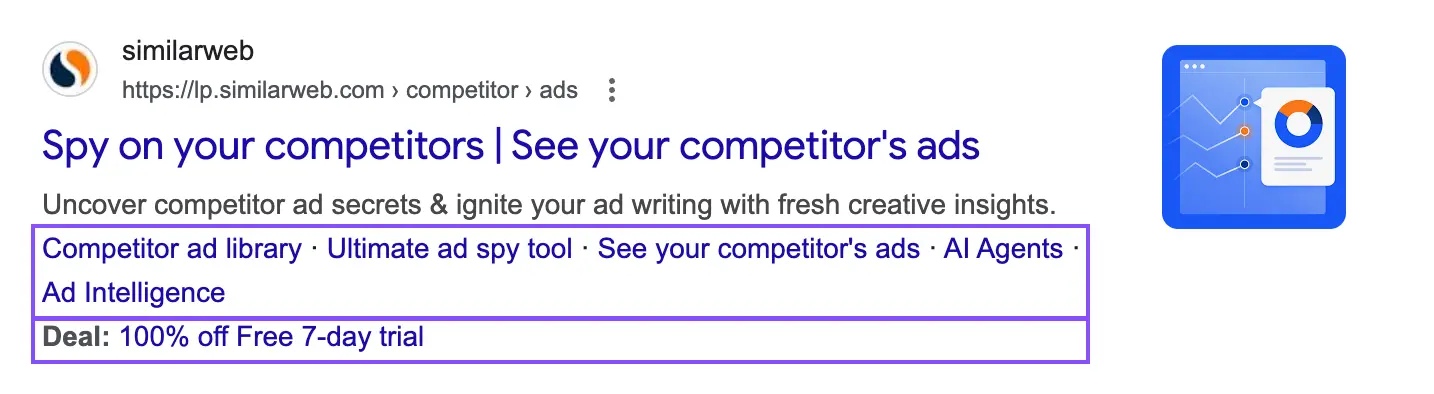
Most people read the main ad and move on. Ad extensions (sitelinks, callouts, structured snippets, price extensions, and review extensions) are where competitors often reveal a lot more about their strategy than they do in the core ad. Sitelinks show you which product lines or pages they consider most conversion-relevant. Callout extensions list the proof points they're most proud of. Price extensions, if they're using them, signal a willingness to compete on price visibility directly in the SERP.
If a competitor is showing a review extension with a high rating and a lot of reviews, that's a deliberate trust-building tactic at the top of funnel. If they're running callouts like "No Setup Fees" or "Cancel Anytime," they're directly addressing objections they know their audience has.
The landing page: where the real strategy lives
The same principle applies here as with any ad format: the click-through is only half the picture. Where a competitor sends their paid search traffic is one of the most strategically revealing things you can observe. Are they sending every keyword to the homepage, or do they have dedicated landing pages per keyword cluster? Is the message on the landing page a tight match to the search ad, or is there a disconnect?
A competitor sending paid traffic to a focused, conversion-optimized landing page with a clear single call to action is running a mature, well-structured paid search program. A competitor sending all traffic to their homepage is either underfunded, under-resourced, or hasn't yet figured out that message match matters. Both tell you something useful about how seriously you need to take them on this channel.
4. How to Identify What's Working Without Access to Their Data
You can't see a competitor's Google Ads account. You don't know their Quality Scores, their CTRs, or their conversion rates. But there are reliable proxy signals that let you make educated inferences about what's performing and what's strategic, rather than accidental.
| SIGNAL | WHAT IT LOOKS LIKE | WHAT IT TELLS YOU |
|---|---|---|
| Ad position consistency | A competitor consistently appears in positions 1-3 across multiple keyword searches over time | High positions on competitive keywords cost money to maintain. Consistent top placement signals profitable economics and deliberate investment in those terms. |
| Keyword breadth | A competitor appears on your branded keywords, your category keywords, and your competitor set's keywords simultaneously | Broad bidding signals meaningful budget and an aggressive acquisition posture. Narrow bidding suggests tighter targeting or smaller spend. |
| Message consistency | The same positioning or value proposition appears in ads across different keyword searches and over multiple months | Consistent messaging that holds over time is usually validated messaging. They've tested their way to it and found it works. |
| Landing page investment | Dedicated landing pages per keyword cluster, with consistent headline-to-ad message match | Purpose-built landing pages are expensive to build and maintain. A competitor investing in them is serious about conversion rate optimization on this channel. |
| Extension richness | Multiple sitelinks, callouts, structured snippets, and review extensions all running simultaneously | Rich extension usage improves ad rank without increasing bid. A competitor maximizing extensions knows what they're doing and is squeezing every advantage from the auction. |
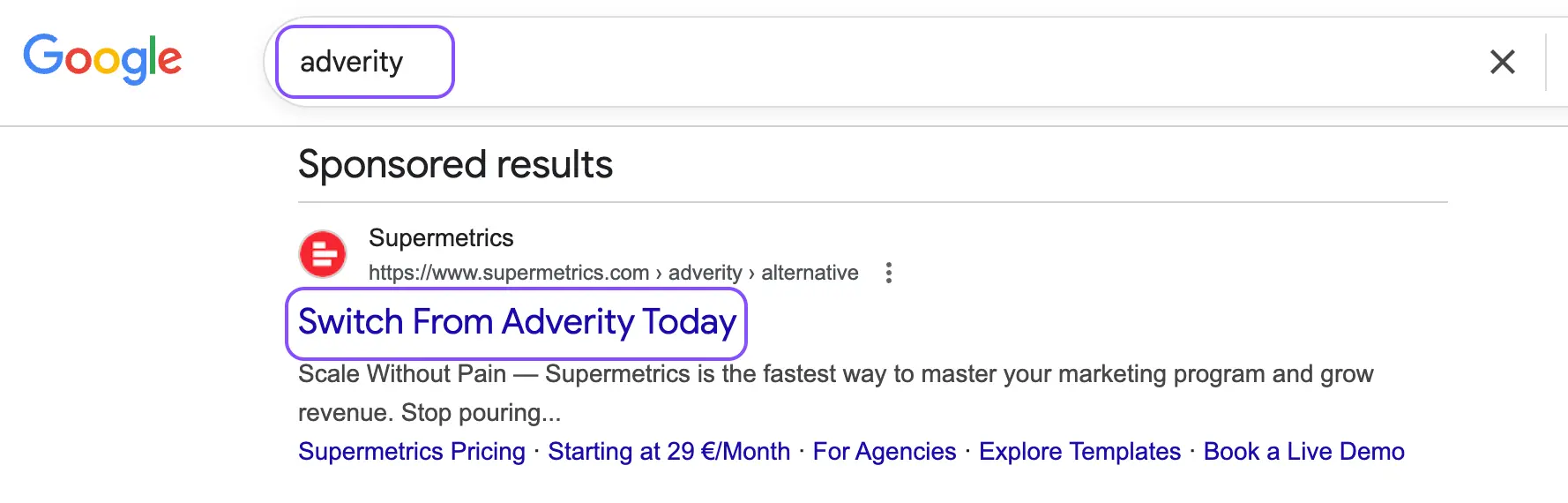
| Brand bidding behavior | Competitors bidding on your brand name, or the brand names of other players in your category | Brand bidding is expensive and deliberate. It signals a direct acquisition strategy targeting audiences who already know a competitor's name, often including yours. |
Watch for the "conquest keyword" signal
If a competitor is bidding on your brand name, check what their ad says. Are they making a direct comparison? Offering a discount to switch? Emphasizing a feature they know you lack? How they're framing that ad tells you exactly where they think they have a competitive advantage over you.
5. Why Manual Tracking Breaks Down
Manually researching competitor Google Ads is harder than the equivalent exercise on Meta, and it breaks down faster. On Meta, the Ad Library gives you a centralized view of every active ad for any brand. On Google, your research is fragmented across direct searches, the Transparency Center, third-party tools, and whatever notes you happened to take last time you did this.
Here's what manual Google Ads competitive research actually looks like in practice: you run a set of test searches from an incognito window, screenshot some ads that look interesting, paste a few headlines into a doc, then get pulled into something else and don't revisit it for two months. Meanwhile, a competitor has updated their messaging, started bidding on three new keyword clusters, and built out a dedicated landing page for the segment you were about to go after. You missed all of it because there was no system in place to catch it.
The fragmentation problem is real. Google search results vary by location, device, time of day, and search history, which means two people searching the same keyword can see different ads. The Transparency Center gives you reach into what's running but not keyword-level context. Third-party tools give you keyword data but at a delay and an additional subscription cost. Stitching these together manually into something your team can actually act on requires more time than most teams have.
Without a proper system
- Research scattered across incognito searches, screenshots, and docs
- Ad copy changes go unnoticed for weeks or months
- No visibility into landing page updates or new keyword bids
- Keyword-level context missing unless you're paying for a third-party tool
- No alerts when a competitor starts bidding on your brand terms
- Teams repeat the same research from scratch every cycle
- Results vary by device and location, so no consistent view exists
With a structured system
- Competitor ads saved and organized alongside their landing pages
- Messaging changes and new campaigns flagged automatically
- Landing page tracking shows when competitors update their funnel
- Cross-platform view of the same competitor across Google, Meta, and LinkedIn
- Alerts when tracked brands launch new campaigns
- Shared collections your whole team can build on over time
- Consistent, structured data that compounds rather than resets
There's also a bigger picture problem that manual Google Ads research misses entirely. Google is rarely the only place a competitor is advertising. The brands you compete with on search are usually also running campaigns on Meta, LinkedIn, or both. Understanding their full paid media picture, not just their search activity, is what gives you a complete read on their strategy and spend allocation. That's almost impossible to do manually across platforms.
6. How to Build a System That Scales
Competitive research on Google Ads is most valuable when it's continuous and cross-channel. A one-time audit tells you where things stood at one moment. An ongoing system tells you how strategy is evolving, when competitors are making big bets, and when opportunities open up because a competitor pulls back.
Define your keyword watchlist
Start by identifying the 20 to 50 keywords that matter most in your category: your core product terms, your main pain-point queries, your competitor brand names, and your own brand name. Run searches on these regularly (monthly at minimum) from an incognito window in the geographic market that matters to you. Note who appears, in what position, with what message. This doesn't need to be elaborate. A simple shared doc with a date column and ad copy pasted in is better than nothing, and it accumulates into a genuinely useful historical record over time.
Track landing pages, not just ads
One of the most underused research habits for Google Ads intelligence is visiting and saving competitor landing pages. Ad copy changes are fast and easy to deploy. Landing page rebuilds are expensive and signal meaningful strategic decisions: a new offer structure, a repositioning effort, a response to a conversion problem they've been struggling with. When you see a competitor's landing page change significantly, that's a more important signal than a headline swap.
Watch for cross-platform patterns
The most sophisticated version of this research is looking at what competitors are doing on Google alongside what they're doing on Meta and LinkedIn at the same time. When a competitor is running an aggressive brand awareness push on Meta and simultaneously increasing their branded keyword bids on Google, that's a coordinated strategy worth paying attention to. Seeing it in one channel gives you part of the picture. Seeing it across channels gives you the full story.
What a mature competitive research workflow looks like
Weekly keyword monitoring across your 20-50 priority terms. Monthly landing page reviews for your top three competitors. Cross-platform tracking of the same brands on Meta, Google, and LinkedIn. Shared collections your team can annotate and build on. Alerts when anything significant changes.
This is exactly what we built Adluv to make straightforward. Instead of bouncing between Google, the Transparency Center, a spy tool, and a shared spreadsheet, Adluv gives your team one place to track competitor ads and landing pages across Meta, Google, LinkedIn, and beyond. You get real-time alerts when tracked brands launch new campaigns, a cross-platform view of each competitor's full ad activity, and shared collections your team can build on over time rather than starting from scratch each cycle.
Utilize AI-native ad intelligence
Adluv plugs into your AI workflow via Model Context Protocol (MCP) so research happens where the thinking does. Instead of switching between a dashboard and your AI tool to make sense of what you're seeing, you can query Adluv's competitor ad data directly from Claude, Cursor, or any MCP-compatible client.
In practice, that means you can ask questions like:
→ "What headlines is [competitor] running on Google for our main category keywords right now?"
→ "Which of our tracked brands updated their landing pages in the last two weeks?"
→ "Summarize the offer and CTA patterns across [competitor]'s current Google Ads."
7. Common Mistakes to Avoid
Only searching your own branded keywords
A lot of teams only check competitor activity when they notice someone bidding on their own brand terms. That's the most obvious place to look, but it's the narrowest. Competitors who are serious about Google Ads are bidding across a broad keyword universe, including category terms, pain-point queries, and adjacent intent keywords that your campaigns may not have reached yet. Limiting your research to branded searches gives you a very incomplete picture of the competitive landscape.
Ignoring ad extensions as a data source
Most people scan the headline and description and stop there. Ad extensions (sitelinks, callouts, structured snippets, price extensions, and review extensions) are often where competitors reveal the most about what they think their customers care about. A callout that says "No Long-Term Contracts" is a positioning response to a known objection. Sitelinks that feature a specific use case are a window into which customer segment they're most actively pursuing right now. Read everything in the ad, not just the headline.
Treating Google in isolation
Paid search doesn't exist independently of the rest of a competitor's marketing. The messaging a brand is testing on Google is often connected to what they're pushing on Meta and LinkedIn. When you only track one channel, you see fragments. The message they're amplifying most aggressively across paid channels, the landing page they're driving traffic to from multiple sources, the offer they're putting in front of every touchpoint, those cross-channel patterns are the real competitive intelligence. Don't look at Google in a silo.
Doing research once and moving on
Google Ads strategy evolves constantly, and the pace of change on search can be faster than on other channels. A competitor can update their headlines, expand their keyword set, and rebuild their landing page in a single week. Research from three months ago may be directionally useful but tactically stale. The brands that use competitive intelligence most effectively are the ones that have made ongoing monitoring part of their workflow, not an occasional project they revisit when someone asks about it.
Key takeaways
- Competitor Google Ads appear across search, display, Shopping, and YouTube, each surface tells you something different
- Start with direct search and the Google Ads Transparency Center before investing in paid tools
- Read every component of a search ad: headline, description, display URL, and all extensions
- Message consistency over time is a stronger signal than any single ad copy choice
- Always follow the click: the landing page is where strategic intent shows up most clearly
- Brand bidding behavior (especially on your terms) reveals where competitors think they have an edge
- Manual research on Google fragments quickly; cross-platform tracking is where the real picture emerges
- The teams that win treat competitive research as ongoing, not occasional
- Adluv's MCP integration lets you query competitor Google Ads data directly inside Claude, Cursor, and other AI tools, so research happens where the thinking does
One Place for All Your Competitor Ad Intelligence
Adluv tracks ads across any brand on Google, Meta, LinkedIn, and beyond. Monitor campaigns, view landing pages, get real-time alerts, and build a shared intelligence library your whole team can act on. Plus: query it all directly from Claude or Cursor via our MCP integration.